Windows 10 and 11 support (32 and 64 bits)
ZaraStudio is compatible with the latest 32 and 64-bit versions of the Windows operating system.

ZaraStudio is professional radio station automation software, offering a robust solution for both live and automated programming.
Its key features include random music programming with crossfade, reception of all kinds of remote commands, a complete programmable event system, four auxiliary players and the handling of up to five sound cards simultaneously.
These features, its versatility and its ease of use make ZaraStudio the ideal tool for all kinds of stations: commercial, online, municipal, school or educational.
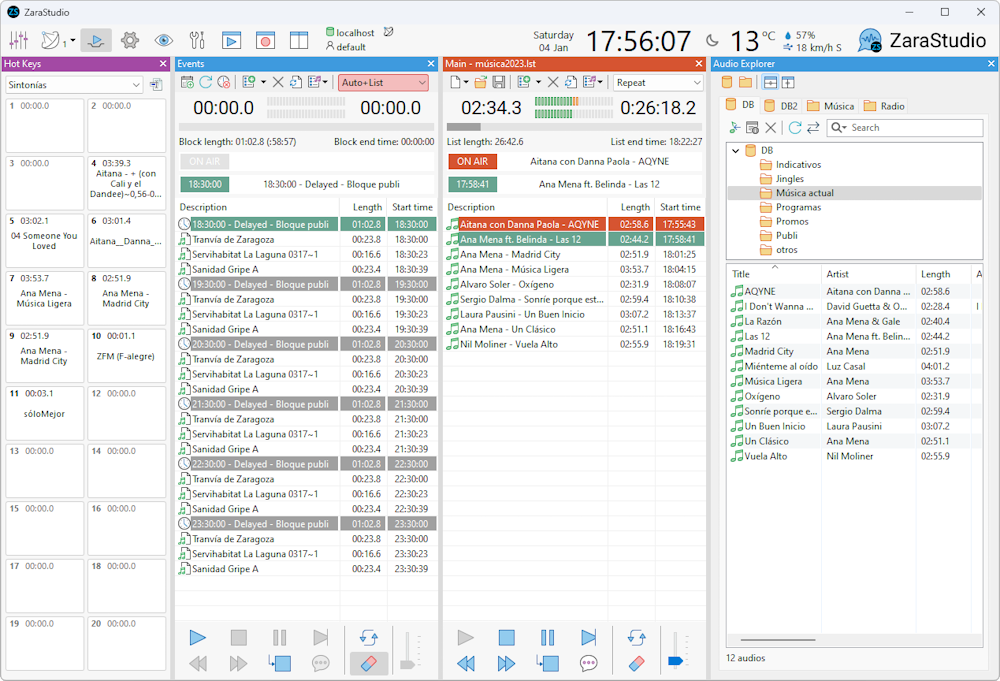
Everything a station needs to broadcast 24 hours a day, 7 days a week.
ZaraStudio is compatible with the latest 32 and 64-bit versions of the Windows operating system.
ZaraStudio works with standard sound cards, even the one built into the motherboard, so there is no need to buy specific equipment to run it (professional sound cards are recommended for the Satellite feature).
ZaraStudio is a standard desktop application and can run standalone without depending on servers. This makes installation and maintenance simpler. However, if you wish, you can also use databases to access advanced features. When a database is used, information is automatically updated on every terminal in the network whenever there is a change.
ZaraStudio is an extremely stable application, so it can run uninterrupted 24 hours a day, 7 days a week.
With ZaraStudio there is no need to convert audio to specific formats, as it supports the most popular ones: MP2, MP3 (CBR and VBR), WAV, OGG, WMA, FLAC and AAC+. There are also no restrictions on sample rate or bitrate.
ZaraStudio can manage up to 6 sound cards at once: one for broadcasting, four for auxiliary players and one for pre-listening.
ZaraStudio can overlap the last seconds of one audio with the first seconds of the next while fading out the first one. Crossfade parameters can be set globally and for each specific file. If the user does not specify these times, ZaraStudio will try to obtain them automatically based on the audio level.
ZaraStudio can rebroadcast up to 10 external signals, coming from the sound card line input or from streaming signals (Icecast, Shoutcast, HLS). This way, connections and disconnections in radio networks can be automated.
ZaraStudio includes a recorder that shows the audio waveform in real time and can trim silences after recording.
ZaraStudio can receive all kinds of remote commands to automate local disconnections in radio networks:
The station's schedule can be configured through the ZaraStudio events module. It is a simple yet powerful tool that lets you schedule audios, playlists or commands at specific times and dates. It also lets you build the day's advertising log in blocks.
ZaraStudio can audit the audios played by the system, so you can know at what exact time and on what date a specific audio was broadcast. It also records any errors that may occur during broadcasting, so they can be detected and corrected.
One of ZaraStudio's most powerful features is “random tracks”. This system picks audios at random from folders chosen by the user, making it possible to build random music programming based on musical styles. It works both with and without a database. When a database is used, advanced controls are available to avoid repeating songs and artists within short periods of time.
ZaraStudio can automatically play song introductions or station IDs over music tracks, keeping the song audio in the background with a gentle fade.
For stations without an audio processor, ZaraStudio provides an Automatic Gain Controller that automatically levels the audio of music tracks. Up to 5 processing parameters can be configured.
ZaraStudio can control up to 5 players or broadcast playlists at once, with the option to route audio to the same or different sound cards. One of the playlists, the main one, is used for automated broadcasting. The other four are used for production or manual live broadcasting.
ZaraStudio lets you play 20 audios with a single mouse click through as many buttons, emulating classic cart machines. It can also keep 10 preconfigured pages of buttons, making up to 200 audios available.
ZaraStudio lets you search for audios on the hard drive or in the database and add them to broadcast playlists by dragging files with the mouse. It also allows pre-listening.
Audio playlists are stored in standard Windows files and are compatible with some popular formats, such as M3U, recognized by Winamp and Windows Media Player. Audios can also be dragged directly from system explorer windows into broadcast playlists.
ZaraStudio also includes small tools that will help you in your daily work.
See the full comparisonDifferences between ZaraRadio Free Edition, ZaraStudio 3 and ZaraStudio 4.
| Feature | Free edition | ZaraStudio 3 | ZaraStudio 4 |
|---|
Source: zarastudio.es/studio-compare
Version 1.6.2 is free and based on version 1.6.1, released in April 2006. It includes several bug fixes and small improvements over that version. ZaraStudio 4 is a different application with major structural changes aimed at better handling local disconnections in radio networks and advertising logs. It also has more advanced features for creating random music programming.
No, because the application needs a USB key to work.
There are several free announcement packs, distributed in two formats: EXE and ZIP. The EXE includes an installer that copies the announcements to your computer automatically, with nothing else to worry about. The ZIP is meant for advanced users. To install it, unzip it inside the ZaraStudio Time folder (usually C:\Program Files\ZaraSoft\ZaraStudio\Time). The MP3 files must be inside the Time folder itself, not in any subfolder.
No. ZaraStudio focuses only on Windows, as it is the most widespread operating system. There are currently no plans to port ZaraStudio to any other platform.
ZaraStudio can connect to Internet radio streams in MP3, WMA and AAC+ format. To do so, run Playlist > Add Internet radio. Enter the connection length and the radio address. Make sure you enter the real stream address, not M3U, PLS or ASX playlists (for example: http://10.0.0.48:8000).
By default, ZaraStudio has an end-of-song detector enabled. As soon as it detects a low audio level at the end of the file, it automatically jumps to the next item in the playlist. With short files, such as station IDs or jingles, this can cause a premature jump. To avoid it, you can set a specific overlap for each file by renaming it with the suffix ~ followed by the maximum overlap time in seconds. For example, the file Indicativo~0.mp3 will always play in full, since it has a zero-second overlap. In version 4 you can also adjust the mix marker in the record of audios registered in the database.
Any current computer capable of running Windows should be enough. However, as a guide, these requirements could be used:
ZaraStudio itself is not an Internet broadcasting program, but a program that automates audio playback. However, it can be used together with other programs dedicated to online broadcasting, so that what ZaraStudio plays is streamed over the Internet. Some of these programs are OddCast, BUTT or WinAmp with the Shoutcast plugin.
Since version 4, weather data is downloaded automatically by ZaraStudio, with no need for external applications.
More information at zarastudio.es/studio-faq
The ZaraStudio 4 license works with a USB key, which is shipped by courier. Write to us and we will help you choose the right setup for your station and process your order.
TODO FM SL does not own the ZaraStudio trademark and is not the developer of the software. ZaraStudio is a trademark owned by Kero Systems S.L., and TODO FM SL acts solely as an authorized distributor.
Distributed by TODO FM SL